
Pinu - Language Learning
LEAF BOAT TECHNOLOGY LIMITEDEducation
3.935.00 Reviews
- Version
- 3.0.0
- Installs
- 50.00K
- Age Rating
- Everyone
Screenshots
Our Review of Pinu - Language Learning
 Analysis by Appyee
I approached Pinu - Language Learning as an education app for people who want language practice to feel less like a worksheet and more like a small daily activity. Its central idea is easy to understand: combine play, speaking, and exploration so that learning feels active rather than purely academic. In my experience, that makes it appealing for beginners, younger learners, and anyone who loses motivation when lessons become too repetitive.
The app is developed by LEAF BOAT TECHNOLOGY LIMITED and is free to install, with optional purchases ranging from $1.99 to $99.99 per item. It is rated for Everyone, which fits its approachable educational purpose, although parents should still look at the purchase options before handing a device to a child. The current version is 2.3.0, and it runs on Android 9 or later. Its average rating is 3.8, based on 43 ratings and 21 reviews, while the install count has passed 10,000.
Those figures suggest a modest but real user base rather than a long-established language platform. I would not choose it expecting the depth of a major course provider. I would choose it when I want a lighter way to build a language habit, especially if speaking practice and a more playful presentation matter more than formal grammar progression.
How Pinu feels to use in everyday learning
I find the everyday appeal of Pinu less about squeezing in a long lesson and more about making a small language task easy to return to. A useful way to judge that fit is to notice whether its playful approach gets you to speak, rather than only recognize words on a screen. That distinction matters most when choosing a realistic moment for practice.
Readability and navigation
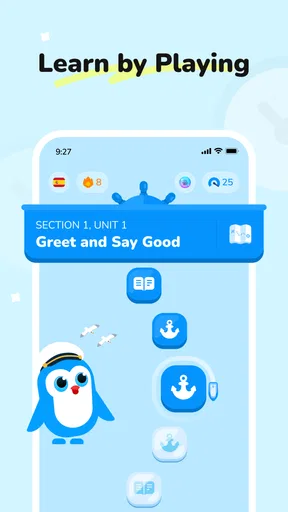
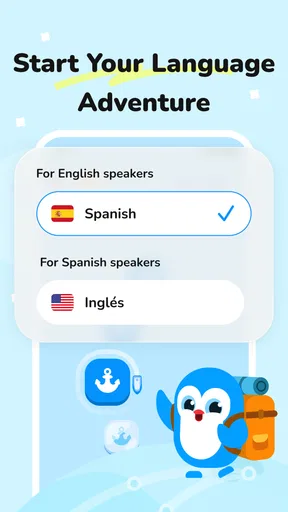
My first impression is that Pinu is designed to reduce the intimidation that often comes with language study. The concept of starting with an adventure gives the learner a clear emotional entry point: open the app, do something, and absorb language through the activity. That is friendlier than being presented with a dense list of grammar topics before doing anything useful.
The short name and simple positioning also make the app easy to identify on a shared phone or tablet. For a learner who is already uncertain about a new language, that matters. A complicated interface can turn a five-minute practice session into a navigation task. Pinu’s value is strongest when its learning path keeps the learner moving forward without forcing them to understand a large course structure first.
Still, visual simplicity should not be confused with complete clarity. Language apps often place important information inside illustrations, animated scenes, or compact prompts. That can be enjoyable, but it may require more attention than a plain text lesson. I found the experience best suited to someone willing to pause and look carefully rather than someone who wants to scan a page quickly and move on.
For readability, I would use the app on the largest comfortable screen available. A phone is convenient for short sessions, but a tablet can make words, buttons, and visual context easier to follow. This is especially useful for children, learners with reduced vision, or anyone who becomes tired when reading small interface elements. The practical tip is simple: increase the device’s system text size if needed, then check whether the app still presents its prompts comfortably before beginning a longer session.
Another useful habit is to treat each visit as a focused task instead of trying to explore every part of the experience at once. I would begin with the speaking activity or the next suggested learning step, complete it, and only then browse around. That approach reduces the chance of confusing exploration with actual practice.
Speaking practice and different motor needs
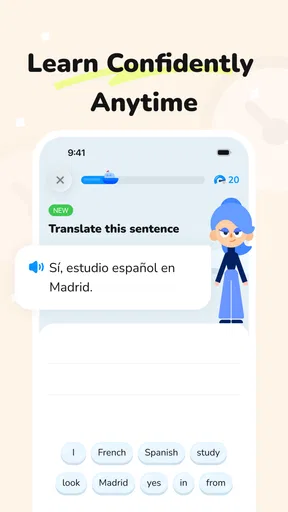
The inclusion of speaking is one of Pinu’s most interesting choices. Many beginner apps allow learners to recognize vocabulary or select answers, but speaking asks for a more active response. That can help someone move from “I know this word when I see it” to “I can attempt it aloud.” For shy learners, the private setting of a phone can make that first attempt less stressful than speaking in a classroom.
At the same time, voice-based interaction creates practical demands. The learner needs to be able to speak, hear the instructions, and use the device controls. Someone with a speech difference, a hearing limitation, temporary laryngitis, or a noisy home environment may not receive the same benefit from the speaking side of the experience. I would not treat spoken practice as a universal measure of language ability. It is one route into learning, not a complete definition of progress.
There are also motor considerations. A learner may be comfortable tapping large, obvious controls but struggle with repeated small targets, fast transitions, or gestures that require precise timing. Because the app combines play with learning, the physical effort may feel less like filling out a form and more like interacting with a game. That can be motivating, but it can also make a session tiring for people with limited hand control or repetitive-strain concerns.
My recommendation is to use a stable surface rather than holding the phone throughout a session. A stand can reduce grip fatigue, while headphones may make spoken prompts easier to hear in a busy room. If speaking is uncomfortable, I would alternate it with quieter activities instead of forcing a long vocal session. This preserves the learning routine without turning the accessibility challenge into a test of endurance.
For children, the playful format may invite experimentation, which is useful for pronunciation confidence. However, an adult may need to sit nearby at first, not because the app is difficult to understand, but because a child may tap quickly, skip instructions, or become more interested in exploring than repeating a word. Short, supervised sessions are likely to produce better learning than leaving the child to continue until attention disappears.
Using it across different situations
Pinu makes the most sense in small pockets of time. I can imagine using it while waiting for an appointment, during a short commute as a passenger, or after dinner when I want something more active than scrolling. The adventure framing helps those brief sessions feel connected, even when I do not have enough time for a full study block.
A realistic example would be a learner preparing for a holiday. Instead of trying to complete a long lesson late at night, I would use Pinu for a few minutes after breakfast, focus on saying the new words aloud, and then return later for another short practice period. The benefit is not that the app replaces a complete travel course. The benefit is that it gives the learner a low-pressure way to rehearse language repeatedly before the trip.
Situational access also depends on sound. Speaking and listening activities are not ideal in a library, a shared office, or a crowded bus. In those places, a learner may need headphones or may prefer to wait until reaching a quieter location. This is an important trade-off: the app can fit into a mobile routine, but its most distinctive learning element is not equally convenient everywhere.
It is also worth thinking about internet and device habits without assuming that every session will happen under perfect conditions. I would open the app before settling into a short practice window, make sure the device has enough battery, and avoid relying on it as the only preparation method for an important conversation. A notebook or saved personal list can support the routine when the phone is unavailable, while Pinu provides the interactive part when conditions are suitable.
Families should pay attention to the free-to-use model. The app costs nothing to install, but optional purchases are available. On a child’s device, I would review the purchase controls first and explain which parts of the experience are available without spending money. That conversation is useful not only for budget reasons but also because a child may interpret a locked item as a failure rather than as a purchasing boundary.
Where it fits beside familiar alternatives
Compared with flashcard apps, Pinu appears better suited to learners who need context and encouragement. Flashcards are excellent when I want to review a known list quickly, measure recall, or study in a very controlled way. They can also be easier to adapt for large text, printed notes, or a completely silent environment. Pinu’s advantage is the attempt to make language feel like an experience rather than a stack of isolated prompts.
Compared with formal language courses, it is more approachable but likely less appropriate as a complete study plan. A structured course is usually the better choice for someone who needs a defined sequence, detailed grammar explanations, writing correction, or preparation for an exam. I would use Pinu as a doorway into regular practice, not as my only resource if I needed professional or academic fluency.
Compared with conversation tutoring, the app offers convenience and privacy but not the same human responsiveness. A tutor can adjust the pace, rephrase a confusing explanation, notice hesitation, and discuss cultural context. Pinu is more practical when cost, scheduling, or embarrassment makes live practice difficult. The trade-off is that the learner must do more of the self-correction and motivation alone.
That comparison helps clarify who should skip it. I would look elsewhere if my main goal were advanced writing, detailed feedback on spontaneous conversation, or a guaranteed curriculum for a specific test. I would also hesitate if spoken activities are central to my plan but I cannot comfortably use audio in my normal study spaces. In those cases, a text-first or tutor-led alternative may be a better match.
Small workflow choices that improve the experience
The first non-obvious lesson I took from using the app is that its playful presentation works best when I set a narrow goal. “Learn a language” is too broad for one sitting. “Practice the words I encountered today” or “repeat the speaking activity until I feel less hesitant” gives the session a finish line. This prevents the exploration element from taking over the learning objective.
Second, I would speak aloud even when I think I already know the answer. Recognition can create false confidence, especially for pronunciation. The speaking component is most useful when I treat it as rehearsal rather than as a score to protect. If I make an awkward attempt, that is still more valuable than silently selecting the correct option every time.
Third, I would pair the app with a real-world cue. After a session, I might write one new word on a shopping note, say it while preparing coffee, or look for an opportunity to recognize it in a message or sign. This turns the app’s short activity into a memory prompt. It also reveals whether I can use the language outside the screen, which a purely in-app success signal may not show.
A fourth useful approach is to separate motivation from accessibility. If I am tired, I should shorten the session rather than assume that difficulty means I am failing. If the screen is uncomfortable, I should change the device position or text settings before blaming my concentration. If speaking is not practical, I should return later instead of forcing an unsuitable environment. These adjustments make the routine more sustainable.
Remaining barriers to keep in mind
Pinu’s inclusive appeal has limits. A playful design can welcome beginners, but it may not provide enough explanation for learners who want to understand why a phrase works. Someone who prefers explicit rules, written drills, or a predictable lesson map may find the experience less satisfying than a conventional course.
The speaking emphasis can also divide users into very different experiences. A confident speaker in a quiet room may find it engaging, while a learner with a speech-related disability or a crowded household may experience the same activity as stressful. I would judge the app by whether it supports my preferred way of practicing, not by whether I can force myself to use every activity.
There is a financial barrier as well. Free installation lowers the entry cost, but the optional purchase range means the overall experience deserves a quick check before a child or family member uses the device independently. I would set a clear spending boundary and avoid assuming that every desirable element is included at no cost.
The app’s relatively small rating and review footprint also means I would approach it as a personal fit rather than a universally proven solution. That is not a criticism of the learning concept. It simply means I would spend a little time testing the navigation, text comfort, audio environment, and practice style before building an entire language plan around it.
My inclusive verdict
I see Pinu - Language Learning as a friendly starting point for people who want language practice to feel lighter, more visual, and more active. Its combination of play, exploration, and speaking can help a beginner overcome the blank-page feeling that often stops a new study habit before it begins. It is particularly promising for short daily sessions, family-supported learning, and learners who respond better to a sense of discovery than to a formal syllabus.
My recommendation comes with clear conditions. I would choose it if I wanted an approachable supplement, if I could use audio comfortably, and if I was happy to build my own broader routine around it. I would choose a more structured course for exam preparation, a flashcard tool for highly controlled review, or a tutor for detailed personal feedback.
For inclusive use, the best approach is to adapt the setting: use a larger screen when reading is tiring, stabilize the device for easier tapping, select a quiet place for speaking, and keep an alternative activity available when voice interaction is not practical. The strongest reason to try Pinu is not that it replaces every language-learning method, but that it can make the first consistent steps feel manageable.
As a free education app from LEAF BOAT TECHNOLOGY LIMITED, it is easy to test without committing to a subscription at the start. I would give it a fair trial through several short sessions rather than judging it after one visit. If its playful rhythm helps me return regularly, it has real value. If I need precise explanations, advanced progression, or flexible silent practice, I would let another tool take the lead and keep Pinu only as a lighter companion.
Privacy and Permissions
See what permissions an app requests and how it handles your data.
- Photos/Media/Files
- read the contents of your USB storage, modify or delete the contents of your USB storage
- Storage
- read the contents of your USB storage, modify or delete the contents of your USB storage
- Camera
- take pictures and videos
- Microphone
- record audio
- Wi-Fi connection information
- view Wi-Fi connections
- Other
- view network connections, full network access, control vibration, prevent device from sleeping, Google Play license check
Verdict
Strengths of Pinu - Language Learning
- Short lessons make it easy to practice during spare moments.
- Useful repetition helps reinforce vocabulary and everyday phrases.
- The interface is simple enough for beginners to navigate quickly.
- Progress tracking can encourage consistent daily study habits.
- Suitable for learners who prefer focused, bite-sized practice.
Limitations of Pinu - Language Learning
- Some advanced learners may find the content too limited.
- Practice variety may become repetitive after extended use.
- Certain features may require a paid subscription to access.
- It may not provide enough speaking practice for fluent conversation.
- Learning results depend heavily on maintaining a regular practice routine.
Similar Picks in This Category
View All
Duolingo: Language Lessons
Duolingo4.7

Google Classroom
Google LLC2.8

Unacademy: Learn & Crack Exams
Unacademy3.2

Bible App for Kids
Life.Church4.4

Cake - Learn English & Korean
Cake Corp.4.7

Brainly: AI Homework Helper
Brainly4.5
Frequently Asked Questions
What is Pinu - Language Learning, and how does it work?
Pinu - Language Learning is designed to help users build language skills through short, interactive learning activities. Based on the experience of using the app, its approach focuses on regular practice rather than long study sessions, making it suitable for beginners and casual learners. Lessons generally combine vocabulary, comprehension, and repetition exercises, allowing you to review material at your own pace and gradually develop a consistent learning habit.
Which languages can I learn with Pinu?
The languages available in Pinu may depend on the current version of the app, your device, and the developer’s regional catalog. Before downloading, it is worth checking the language list shown on the official Google Play Store or App Store page, especially if you are looking for a less commonly supported language. The app is most useful when your target language is clearly included and the lesson level matches your current ability.
Is Pinu suitable for complete beginners?
Yes, Pinu can be useful for complete beginners because its learning format is based on manageable activities and repeated exposure to essential language content. New users should still expect to spend time learning basic vocabulary, pronunciation, and sentence patterns rather than becoming fluent immediately. The app works best as a daily practice tool, while conversation with native speakers, listening to real media, and additional grammar resources can provide broader development.
Does Pinu require a subscription or include in-app purchases?
Pinu may offer free learning content alongside premium features, subscriptions, or other in-app purchases, depending on the platform and the version available in your region. Review the pricing details carefully before starting a trial, including the renewal terms and cancellation process. Some features may be accessible without payment, but users who want the complete course, extra practice, or advanced tools should check the store listing for the most accurate costs.
Can I use Pinu offline, and is my progress synchronized?
Offline access and progress synchronization can vary according to the app version, account setup, and the specific lessons or features you use. Some learning material may need to be downloaded in advance, while other activities can require an internet connection. If you use multiple devices, sign in with the same supported account and confirm that synchronization is enabled. It is also wise to open the app online periodically so recent progress can be saved correctly.
